This article was originally published to a blog which has been decommissioned.
Business Intelligence (BI) projects are usually intended to meet a hybrid of different needs, frequently including standardized reports and dashboards, self-service reporting, and data discovery tools. Quite often, unexpected relationships and architectural challenges are found in data during the course of a project. Experienced BI teams are not strangers to mid-project discoveries such as many-to-many relationships instead of traditional dimensions, key relationships that do not map properly, and calculations that need to be modified for the unique needs of the business users.
Despite detailed working sessions with business users and preliminary data analysis, sometimes changes to requirements are needed for a project to meet the needs of the business. Even the most carefully planned projects can end up with initial SOWs that don’t fully capture the details of the actual development required to complete a project.
This article was originally published to a blog which has been decommissioned.
This is Part Two, the final of two blog posts about automating the creation of a Bus Matrix in Power Pivot for Excel using DMV queries from an SSAS Tabular Model.
This article was originally published to a blog which has been decommissioned.
This is Part One of two blog posts about automating the creation of a Bus Matrix in Power Pivot for Excel using DMV queries from an SSAS Tabular Model.
Open Data is freely available for everyone to use and republish as they wish without restrictions from copyright, patents or other mechanisms of control. The United States Government has a dedicated open data portal at Data.gov, and there are now hundreds if not thousands of open data portals from countries, provinces, counties, companies, and cities. Now that there is open data available for you to reach out and grab, what comes next? I’ll review the maturation process of the open data movement, some examples of what’s been done with it by myself and others, and how Microsoft BI tools (Excel, Power Pivot, Power Query, Power View, Azure ML) are prime for mashing it up to make it usable and understandable.
The media frequently speculates about the relationship between hot summer weather and murders in Chicago. With both Chicago crime and daily weather information available to the public as open data, comparing the two phenomena is possible. Below is an interactive data visualization (point and click around on it) of Chicago homicides and weather:
var divElement = document.getElementById(‘viz1753911112435’); var vizElement = divElement.getElementsByTagName(‘object’)[0]; vizElement.style.minWidth=’580px’;vizElement.style.maxWidth=’800px’;vizElement.style.width=’100%’;vizElement.style.minHeight=’550px’;vizElement.style.maxHeight=’650px’;vizElement.style.height=(divElement.offsetWidth*0.75)+’px’; var scriptElement = document.createElement(‘script’); scriptElement.src = ‘https://public.tableau.com/javascripts/api/viz_v1.js’; vizElement.parentNode.insertBefore(scriptElement, vizElement);
The bar chart in the upper right represents the “Homicide Rate per Day” for each 10 degree span of Fahrenheit degrees. The color of the bars represents the total homicides in that bar. The color red represents the most homicides. Use the filters on the right hand side to filter the data visualization by years or by Chicago Community Area.
Before proceeding further, I should note that not statistical analysis was done on either data set to prove any claims about the data. I have just pulled in publicly available crime data from Chicago, along with publicly available Cook County weather data, and then used free software to create these interactive visualizations. From the above data visualization, it appears that the homicide rate does indeed go up on warmer days.
Perhaps some of the eye-catching numbers in the press are backed up by data. However, the yearly homicide total graph at the bottom of the visualization shows that total homicides were trending down from 2002-2011. Are certain neighborhoods more prone to homicide than others? Let’s take a look at an interactive heatmap that shows total homicides by size of each square, and homicides per day as the color of the squares. Each square represents a 10 degree Fahrenheit span for a Chicago Community Area:
var divElement = document.getElementById(‘viz1753911201116’); var vizElement = divElement.getElementsByTagName(‘object’)[0]; vizElement.style.minWidth=’520px’;vizElement.style.maxWidth=’800px’;vizElement.style.width=’100%’;vizElement.style.minHeight=’330px’;vizElement.style.maxHeight=’590px’;vizElement.style.height=(divElement.offsetWidth*0.75)+’px’; var scriptElement = document.createElement(‘script’); scriptElement.src = ‘https://public.tableau.com/javascripts/api/viz_v1.js’; vizElement.parentNode.insertBefore(scriptElement, vizElement);
Another way to visualize this relationship is with a treemap. Below it appears clear that more homicides, and more homicides per day happen on warm days in the Community Areas in the upper left:
var divElement = document.getElementById(‘viz1753911251807’); var vizElement = divElement.getElementsByTagName(‘object’)[0]; vizElement.style.minWidth=’520px’;vizElement.style.maxWidth=’800px’;vizElement.style.width=’100%’;vizElement.style.height=’610px’; var scriptElement = document.createElement(‘script’); scriptElement.src = ‘https://public.tableau.com/javascripts/api/viz_v1.js’; vizElement.parentNode.insertBefore(scriptElement, vizElement);
Once again, this article is not attempting to make any claims. I’m just demonstrating that mashing up open data from different sources can be useful and interesting. There are many factors which could impact homicide rates in Chicago. Despite the apparent relationship between hot days and homicides, it appears that hot years do not necessarily result in greater violence. Correlation does not equal causation. Looking at the chart below, years with more hot days did not necessarily translate into a more homicides for the year:
var divElement = document.getElementById(‘viz1753911343497’); var vizElement = divElement.getElementsByTagName(‘object’)[0]; vizElement.style.width=’100%’;vizElement.style.height=(divElement.offsetWidth*0.75)+’px’; var scriptElement = document.createElement(‘script’); scriptElement.src = ‘https://public.tableau.com/javascripts/api/viz_v1.js’; vizElement.parentNode.insertBefore(scriptElement, vizElement);
(click the filter values and hover over bubbles and bar graph colors, it’s interactive!)
var divElement = document.getElementById(‘viz1753909590175’); var vizElement = divElement.getElementsByTagName(‘object’)[0]; vizElement.style.minWidth=’420px’;vizElement.style.maxWidth=’800px’;vizElement.style.width=’100%’;vizElement.style.minHeight=’587px’;vizElement.style.maxHeight=’827px’;vizElement.style.height=(divElement.offsetWidth*0.75)+’px’; var scriptElement = document.createElement(‘script’); scriptElement.src = ‘https://public.tableau.com/javascripts/api/viz_v1.js’; vizElement.parentNode.insertBefore(scriptElement, vizElement);
The above dashboard visualizes San Francisco Police Department Incident Reports for the year 2013. Tableau Public was used to create this dashboard. The added bonus of using an interactive, dynamic dashboard is that you can filter the data and modify the detail levels on the charts and table. Go ahead and select different report “Category” and “Pd District” values to watch the data visualizations change. You can click the “+” and “-” buttons by the months and quarters on the bottom bar chart to change the detail level of the data by date aggregations, too.
I’ve previously published articles featuring this San Francisco Police Reports data, which are linked below if you’d like to explore the data further or start building your own dashboards:
Need a break from browsing accounting ledger open data? Take an hour to browse the BC Liquor Store Product Price list which is available on British Columbia’s DataBC open data platform. You might find the data to be interesting and useful, and the hour that you spend working with it might even be a happy hour.
British Columbia has an open data platform, called DataBC, and on it is available a data set from BC Liquor Stores named BC Liquor Store Product Price List – Current Prices. The data set contains information about liquor product pricing, units per package, alcohol content, liquid and volume, along with country of origin and a classification hierarchy. In other words, the data set is ideal to pour through using an interactive business intelligence tool.
In the screenshot examples below, I pulled the BC Liquor Store Product Price List into Excel 2013 with Power Pivot. Using the source data I was able to assign a classification hierarchy (see the drill-downs on the Pivot Table) and create new calculations $ per L of Alcohol, Display Price Avg, and Product Count. The slicers on the left side of the page filter the Pivot Table and both Pivot Charts. The upper right chart shows the top 20 liquor products offering the most affordable price per L of alcohol. In other words, it provides a list of the products with the best bang for the buck. The bottom right chart shows a count of products by country of origin, broken down by Product Class Name:
Slicing the report for “Beer” changes the values on the report. Notice that “PACIFIC WESTERN – TNT STRONG CAN” contains the most alcohol for your money at $47.05 per L. Using TNT in the name appears to be an accurate description. Looking to the bottom right, it is obvious that the vast majority of beers on the list are from Canada:
Filtering for both “Spirits” and “Wine” shows a different perspective. Expanding the hierarchy from “Spirits,” to “Canadian Whisky,” to “Canadian Rye Whiskey” gives a detailed list of products and their pricing on the Pivot Chart. You can also see in the bottom right chart that France has the most total products in this subset, mostly due to the orange part of the bar which is for “Wine”:
Filtering just for the United States, and expanding “American Whisky” reveals the American Whisky products on the Pivot Table from the data mashup. A sour mash mashup:
The BC Liquor Store Product Price List from British Columbia’s DataBC open data platform is proof, rather very high proof that open data can be diverse and interesting. Learn more about the data, their open data usage license, and explore other British Columbia DataBC open data sets from this link. Soon enough you’ll be distilling your own results from open data.
The World Bank provides open data about development in countries across the globe including data about agricultural land and forest area by country over time. Combining both of these data sets with their land area data can give new insights into the relationship between agricultural and forestry land over time.
The trends of forest land and agricultural land over time can be visualized effectively using an interactive scatter chart. For this example, the cumulative changes in square kilometers from 1992-2011 are visualized with forestry land on the y axis and agricultural land on the x axis. The size of the bubble represents the total forest land area of the country:
Most countries are clustered near the center of the scatter chart, and there are some interesting countries that stand out as having the most drastic changes. Notice that China is in the upper right quadrant which indicates gains in both forest and agricultural land. With a booming economy and large population, a gain in agricultural land is not a surprise. A gain in forest land might surprise a few people, but a quick internet search revealed that China has been implementing a reforestation program for decades. In fact, their total forest land has continued to increase in 2014.
Saudi Arabia is showing the greatest increase in agricultural land (total square kilometers). Did you think that Saudi Arabia was all desert? Think again, as the Saudi government has a program to develop viable agricultural land from desert which has been making gains over the last three decades.
Australia and Sudan appear to be losing both forest and agricultural land. Changes in Australian agriculture and urban sprawl have contributed to Australia’s agricultural land loss, and lost forest land may be due to land usage policies. Sudan has seen a loss of forest land following decades of war.
Brazil and Indonesia both show gains in agricultural land and declines in forest land. This 2014 article claims that Indonesia has now surpassed Brazil in total deforestation.
Combining different data is easier than ever with advanced business tools that are able to mash up and analyze large volumes of data. Open Data Bits provides free resources to help you mash up open data from different places.
The City of Minneapolis has made restaurant inspection data available to the public as open data. A useful example of how this data can be used and exposed to the public can be found at this link, which provides a web based map that displays the results of the restaurant inspections on a map. The Open Twin Cities open data user group has set up a Socrata portal that exposes the raw data at this link.
New York City also makes restaurant inspection data available to the public. Comparing and contrasting NYC and Minneapolis restaurant inspection data requires a data mashup since both data sets are from different sources. Keep reading below to see what happens when you mash up these data sets.
While the two data sets have some different attributes, they can be mashed up using the Date and Zip Code fields. The resulting data model would looks as follows:
Once the data model has been created, measures can be created that compare the two data sets by Date and Zip Code values. The screenshot below shows an Excel report displaying the data mashup using Power Pivot. The slicers on the left filter NYC and Minneapolis data on the Pivot Table and Pivot Charts. Measures such as Critical % (% of inspections with a critical flag) and Inspection Counts can be compared by month, by year, by zip code, and by state. Take note that the criteria to flag something as “critical” may be very different for both cities and you would need additional requirements and data definitions from the agencies that curate both data sets before using this mashup as a direct comparison of results:
Another example of how this data can be visualized uses Zip Codes and addresses to plot the data in a mashed up Power View for Excel report:
Drilling into a zip code reveals data for individual restaurants:
Restaurant inspection data that is made open by other cities can be mashed up with both of these data sets for more robust analysis. The same methodology used in this post and the corresponding links can be applied to any data containing Date and Zip Code fields. The resulting data mashup can be used for trend analysis, or for simply browsing restaurants that you might visit.
The United Kingdom has a robust, accessible, and useful open data portal. One of the data sets that has been made available to the public is Road Safety Data from the Department for Transport. The data set contains a wealth of information about accidents that involved casualties in Great Britain. Documentation for this data to help you access, mash up, and build your own dynamic analytic reports is now available in the Open Data Bits library.
The Great Britain Road Safety Data contains dozens of unique attributes that can be used to slice and dice data. An extensive and useful business intelligence data model can be built out with minimal effort, but the full value of the data set can be realized with a little bit of ETL work between the relational tables.
For the examples below, the full data set was modeled and pulled into Power Pivot for Excel 2013. The resulting data model was then used to create the interactive examples.
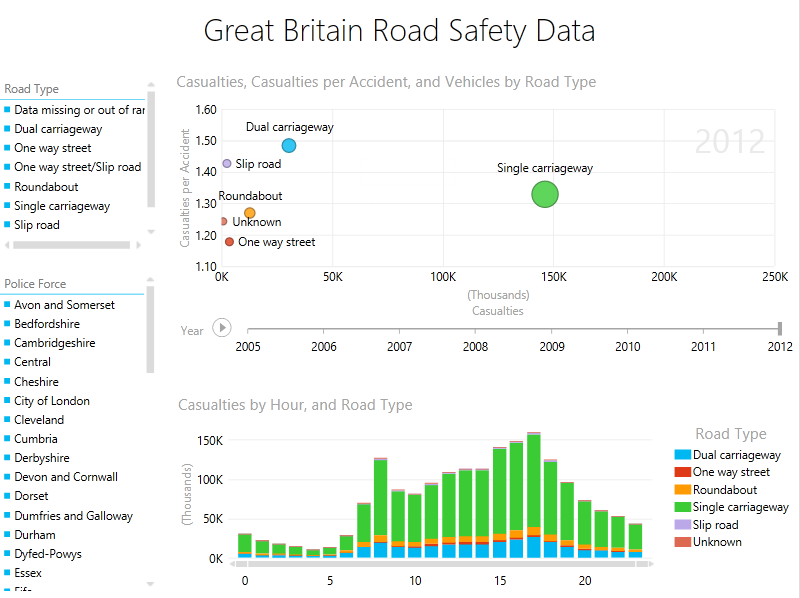
Using Power View for Excel 2013, a high level view shows the relationship between 1) different Road Types (by Casualties, Casualties per Accident, Total Vehicles, and Year) in the top chart and 2) hour of the day by Road Type in the bottom chart. Attributes for Road Type and Police Force were selected from dozens of choices to be used as filters:
Filtering for the Road Type Single Carriageway shows that within the data set, Total Casualties and Casualties per Accident appear to trend downwards from 2005-2012: